

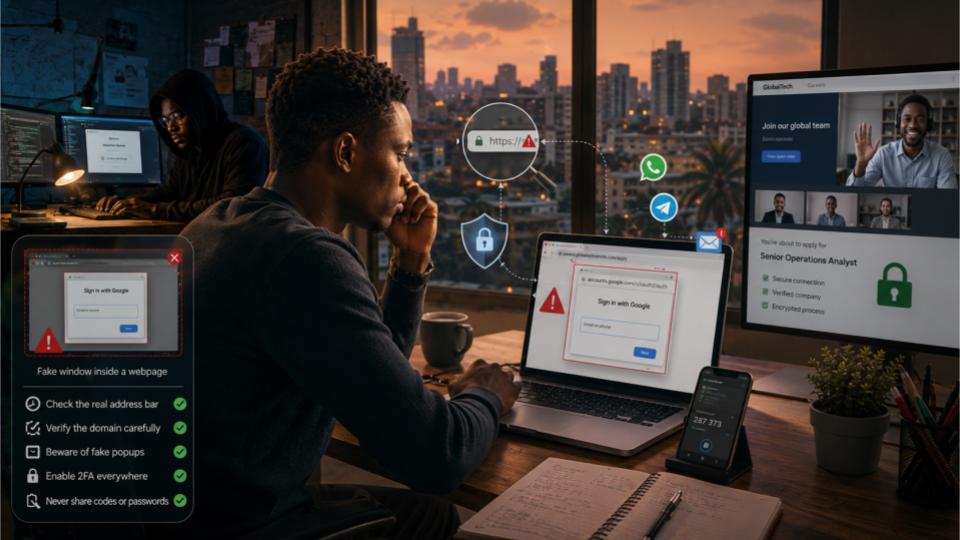
A fake popup window can now copy a real Google or LinkedIn sign in screen almost perfectly. Here is how the scam works, why it is showing up in Nigerian job hunting circles this year, and the simple habits that keep your accounts out of a stranger’s hands.
If you have been job hunting in Nigeria this year, you already know the routine. You see a remote role with dollar pay, you click apply, and somewhere along the line a button tells you to continue with Google or sign in with LinkedIn. Most of the time that button does exactly what it says. But a growing number of scam pages are now using it to run one of the more convincing tricks in modern phishing, called a browser in the browser attack, or BITB for short.
This is not a story to make you afraid of every job link you see. It is a story to help you recognise five seconds worth of detail that separates a real sign in screen from a fake one, because in this particular scam, five seconds is usually all you get before you have either protected yourself or handed your login straight to a stranger.
What a BITB attack actually is
Every browser you use, whether it is Chrome, Edge, Safari, or Firefox, has its own real window with its own address bar, tabs, and lock icon. When a website asks you to sign in with Google or Microsoft, a genuine separate popup window normally opens, controlled by your operating system, with its own address bar showing accounts.google.com or login.microsoftonline.com.
A browser in the browser attack skips all of that. Instead of opening a real second window, the scam page simply draws a picture of one, using the same web code that builds the rest of the page. That picture includes a fake title bar, a fake address bar with a web address typed out in plain text, and form fields that look exactly like a login box. None of it is a real window. It cannot be dragged outside the page, it has no real browser security behind it, and the moment you type your email and password into it, that information goes straight to the person who built the page, not to Google or Microsoft.
Security researchers first documented this trick publicly around 2022, but in 2026 it has matured. The fake popups are pixel accurate copies of real sign in screens, complete with matching fonts, loading animations, and even fake two factor prompts that ask for the code from your authenticator app.
Why this matters more for Nigerian job seekers right now
Three things are colliding in the Nigerian job market this year, and together they make BITB a sharper threat than it was even two years ago.
The first is the sheer scale of remote and international job seeking. With the cost of living pressure that has pushed so many Nigerians toward the Japa route or toward remote roles that pay in dollars or pounds, competition for genuine remote positions is intense. That pressure makes people move fast and skip the small checks they would normally make, especially when a recruiter message promises a quick interview slot or an urgent deadline.
The second is how normal it has become to sign in with Google or LinkedIn instead of creating a fresh password for every job board. That habit is generally a good one for security, but it also means most job seekers are used to seeing a Google or LinkedIn popup appear without questioning it, which is exactly the muscle memory a BITB page is built to exploit.
The third is distribution. A large share of job leads in Nigeria now travel through WhatsApp groups, Telegram channels, and forwarded LinkedIn posts rather than directly from a company’s own careers page. A link shared in a forwarded message carries none of the trust signals you would get from typing a company’s address yourself, and scam kits built for this exact funnel are now sold cheaply in underground Telegram markets, often with a Nigeria specific template already included.
The five giveaways, explained
Look back at the illustration above. Every fake popup shares a small set of weaknesses, because there is no way to fully fake a real browser window from inside a web page. Here is what each numbered point means in practice.
1. The real address bar never changes
Your browser’s actual address bar sits at the very top of the screen, outside the page content. On a genuine Google sign in, that real address bar updates to show accounts.google.com. With a BITB attack, the real address bar keeps showing the scam site’s own address the entire time, because no real navigation ever happened. Make it a habit to glance at the true top of your browser, not the address bar drawn inside the popup.
2. The fake popup cannot leave the page
A real popup window is independent of the page that opened it. You can drag it anywhere on your screen, even past the edge of your browser, onto a second monitor, or behind another application. Try dragging the window by its title bar. If it refuses to move outside the boundary of the page you are on, it is not a real window.
3. The address text inside the popup cannot be selected properly
In a real browser window, you can click into the address bar, select the text, and copy it. In a fake popup, that address line is often just an image or a piece of text that behaves strangely when you try to highlight it, sometimes selecting the whole page instead of just that line.
4. There is no padlock you can actually click
On a real sign in window, clicking the small padlock icon opens certificate details that confirm who actually owns the site. On a fake popup, that padlock is just a small picture. Clicking it does nothing, or it does something unrelated to a certificate.
5. The trigger button asked you to sign in unusually fast
This last one is behavioral rather than visual. Genuine career platforms rarely demand an account sign in before you have even seen a real job description, salary range, or company name spelled correctly. A page that rushes you to authenticate before giving you any real information is a pattern worth slowing down for, BITB or not.
Quick rule of thumb. If a sign in popup appears after clicking a job link from WhatsApp, Telegram, or an unsolicited message, close the tab, open a fresh tab, and type the company’s known web address yourself. Never complete a sign in inside a window you did not expect.
Three scenarios that show how the scam plays out
Scenario one
Chiamaka, Lagos. A recruiter messages her on WhatsApp about a remote customer success role paying in dollars. The link leads to a polished careers page with a real sounding company name. She clicks Continue with Google, a familiar looking popup appears, and she types her email and password without a second thought because the page looked identical to ones she had used before. Two days later, strange password reset emails start arriving for her bank’s mobile app, because the scammers used her email access to intercept a reset link.
Scenario two
Tunde, Port Harcourt. He applies through an actual job board he found himself, then receives a follow up email asking him to verify his profile through a link before an interview can be scheduled. The link opens a fake LinkedIn sign in popup. Because Tunde has the habit of checking whether he can drag a sign in window, he notices the popup is locked inside the page, closes the tab, and reports the email to the job board instead.
Scenario three
Blessing, Abuja. She is offered a remote data entry role and is asked to sign in to access a shared onboarding document. The fake popup also asks for her authenticator code after the password, which she enters without suspicion. Because the scammer is collecting the code live, they use it within seconds on the real Google login page, gaining full access before the code expires, which shows why a one time code alone is not a complete defence if the underlying password has already been stolen.
If you think you have already typed your details into a fake popup
Move quickly but calmly. The steps below matter more than panic.
- Open a fresh browser tab and type the real website address yourself, rather than clicking any link again.
- Change the password on that account immediately, and on any other account where you reused the same password.
- Turn on two factor authentication using an authenticator app rather than text messages, since SMS codes can be intercepted more easily.
- Check your account’s recent activity or connected apps and devices list, and remove anything you do not recognise.
- If your email account was affected, check whether it is linked to your bank app, BVN registered services, or any fintech wallet, and contact that institution’s fraud line the same day.
- Report the scam page to ngCERT under NITDA and, if money was involved, to the Economic and Financial Crimes Commission through their official channels.
Good habit going forward. A password manager helps here too, since it will only autofill your password on the actual saved web address. If your password manager refuses to fill in a login box automatically, treat that as a warning sign rather than an inconvenience.
A short checklist for recruiters and employers too
This scam does not only hurt job seekers. It damages the reputation of legitimate Nigerian employers and remote agencies whose names get copied. If you are hiring, a few habits protect your candidates and your brand at the same time.
- Only ever send candidates to your verified careers page address, never to a third party link for sign in.
- Avoid asking candidates to sign in or verify accounts before an interview has even been confirmed by a named human contact.
- Publish your official recruitment domain and any verified LinkedIn company page clearly, so candidates have something fixed to compare suspicious links against.
- If your brand is being impersonated, report the fake page to the hosting provider and warn applicants through your real social media channels as soon as you notice.
Building the habit, not just the awareness
None of the protections above require technical skill. They require a pause. The entire BITB trick depends on speed, on a job seeker moving from excitement about an opportunity straight into typing a password without that half second check of where exactly the request is coming from. Slowing down at the sign in moment costs you nothing if the job is real, and it saves you everything if it is not.
As more of Nigeria’s hiring activity moves online, through remote roles, freelance platforms, and dollar paying contracts, scams will keep adapting to look like whatever job seekers trust most this year. The fix is not to trust less. It is to verify in the right place, at the right moment, every single time a password is involved.
This article provides general digital safety information for job seekers and is not a substitute for professional cybersecurity or legal advice. If you have suffered financial loss, contact your bank and the relevant Nigerian authorities directly for incident specific guidance.
Frequently asked questions
BITB stands for browser in the browser. It is a phishing trick where a fake website draws a popup window inside your own browser screen that looks like a real sign in popup from Google, Microsoft, or LinkedIn. The popup is not a real browser window at all. It is a picture built with code, and anything you type into it goes straight to the scammer.
A normal phishing link usually sends you to a fake page with its own web address that you can check in the address bar. A BITB attack hides inside a page you may have already trusted, then opens a fake popup that copies the look of a familiar sign in screen, including a fake address bar, so the trick is harder to notice.
Yes, in some cases. Because the fake popup can also ask for your one time code, a scammer who is collecting your details in real time can use that code immediately on the real site before it expires. A hardware key or an authenticator app with number matching is safer than codes sent by text message.
It is generally safe on websites you reached by typing the address yourself or through a bookmark you trust. The danger comes from clicking a sign in button inside a page you arrived at through an unexpected link, especially one shared in WhatsApp or Telegram job groups.
Go to the real site directly by typing the address yourself, change the password immediately, turn on two factor authentication through an authenticator app, and check the account’s recent activity or connected apps list for anything you do not recognise. If the email is linked to your bank or BVN details, alert your bank’s fraud line the same day.
You can report to the Nigeria Computer Emergency Response Team, known as ngCERT, under NITDA, and to the Economic and Financial Crimes Commission through their official reporting channels. If money was moved from your account, report to your bank’s fraud desk immediately, since fast reporting improves the chance of recovery.
